Wallpics - Live Wallpapers 4K
- 4.8
- Rating
- 1.00M
- Installs
- Free
- Price

 Analysis by App-foxy
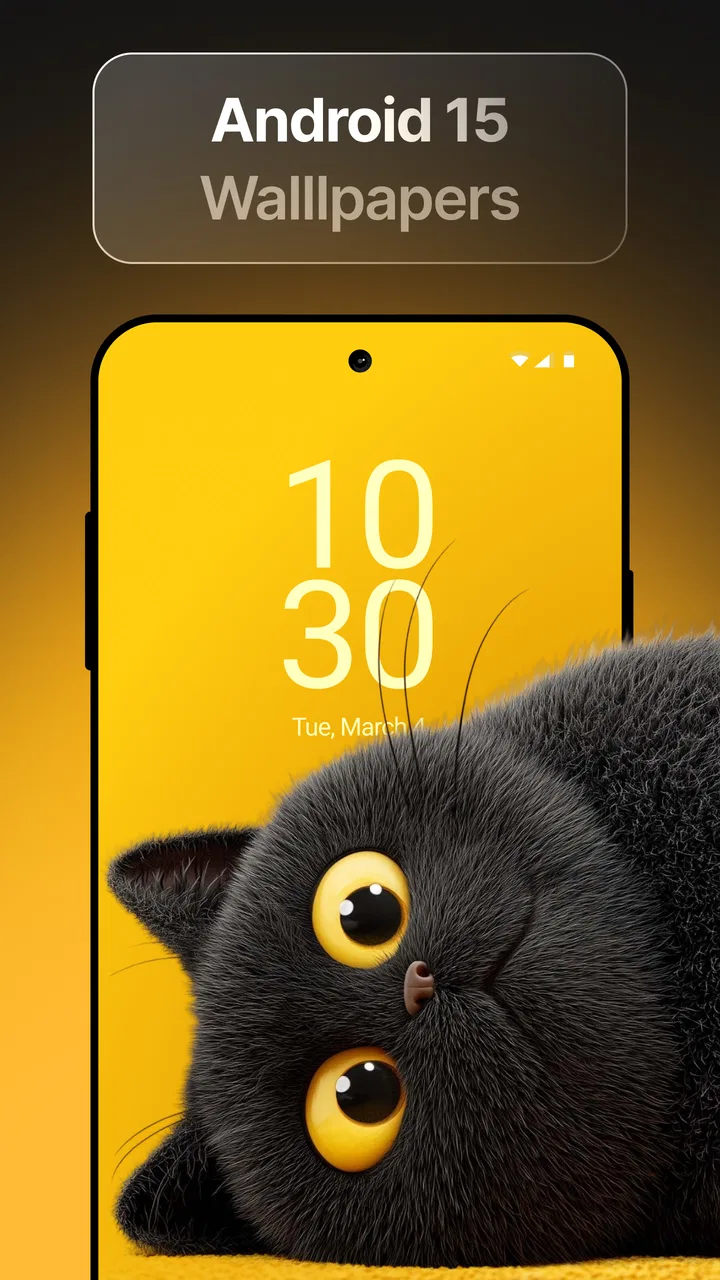
I spent time with Wallpics - Live Wallpapers 4K as a personalization app, and my first impression was straightforward: it is designed for people who want the phone to feel more alive every time they unlock it. Instead of treating the wallpaper as a static picture, it brings together moving backgrounds, high-definition screen savers, charging animations and other visual touches in one place. That combination makes it more interesting than a basic wallpaper gallery, although it also means the app is best judged by how much visual change you actually want in daily use.
Developed by Gamentica, Wallpics has built a solid audience since its release on October 14, 2024. It is free to install, carries a Teen content rating, and works on Android 8.0 or later. Its current version is 1.0.54, and the app has passed the one-million-install mark with an average rating of 4.4 from roughly thirty-eight thousand ratings. Those figures suggest that it has found a real audience, but they do not automatically mean it will suit every phone or every taste. Wallpaper apps are personal by nature, so the practical details matter more than popularity alone.
What the free starting point actually gives you
The most important cost detail is that Wallpics can be installed and explored without an upfront payment. That makes it easy to test the visual style before deciding whether it deserves a permanent place on your phone. The app also includes in-app purchases priced from $1.99 to $12.99 per item. I would therefore treat it as a free starting point with optional paid content or upgrades, rather than assuming that every attractive element is included at no cost.
You May Also Like

 Blood Strike: 2.5 Anniversary
Blood Strike’s Loadouts Turn Every Drop Into a Tactical Gamble
A close look at Blood Strike’s custom loadouts: how fast access to signature weapons reshapes its battle royale rhythm, rewards preparation, and narrows the gap between fights.

 Pandora - Music & Podcasts
Pandora’s Music Is Easy to Start, but Harder to Recover
Pandora’s strength is its low-effort path from a seed to a station. Its weak spot is how much confidence it asks you to place in connection, setup, and quiet recovery.

 8 Ball Pool
 Is Built on Rivalries, Rematches, and Routine
A close look at the rivalries, rematches, shared routines, and unanswered safety questions that turn a quick pool match into a persistent mobile community.

 Samsung Music
’s Quiet Strength Is Playing What You Already Own
Its reach comes less from spectacle than from dependable access to a personal library. That simplicity is both the app’s strongest retention engine and its ceiling.

 AccuWeather: Weather Radar
AccuWeather Review: A Quick, Clear Forecast for Everyday Decisions
For everyday plans, the best forecast is the one you can understand quickly. AccuWeather makes rain timing, radar, and local conditions easy to act on, with a few trade-offs.

 Hill Climb Racing
Why Hill Climb Racing Still Turns Crashes Into One More Run
A tiny car, a bumpy hill and one more upgrade: Hill Climb Racing keeps resurfacing because its simple chaos makes every near-miss feel personal.
More From Our News Desk



That distinction is useful because wallpaper apps often look impressive in previews while the everyday value depends on what is available after the first few minutes. With Wallpics, I would begin by checking the free selection, trying a few backgrounds on the actual device, and only then considering a purchase. A wallpaper can look excellent in a store preview but feel too busy behind icons, too bright at night, or less appealing after several days. The free entry makes that trial process less risky.
The paid range is broad enough that the value decision depends on how seriously you treat phone customization. Spending the lower amount on a favorite visual may feel reasonable if you look at it every day. The higher end deserves more thought, especially if you regularly change wallpapers or prefer to find free images elsewhere. I would not buy simply because an animation is technically attractive. I would buy only when it improves the way I use the phone rather than adding another visual distraction.
How I approached the first setup
I found it more useful to judge the app from the lock screen and home screen together. A background that works on the lock screen may become difficult to read once icons and widgets are placed over it. Before settling on one, I would check whether the main subject sits behind the clock, whether bright areas compete with notification text, and whether the motion makes the screen feel calmer or busier.
This is one of the less obvious decisions with live wallpaper apps: the best image is not always the most dramatic preview. A restrained moving scene can remain comfortable for weeks, while a highly energetic animation may be exciting for a day and irritating afterward. Wallpics is more rewarding when I select backgrounds according to the phone’s layout instead of choosing only by thumbnail.
Charging animations deserve the same practical test. They can make a familiar moment feel more customized, but the effect is temporary and depends on how often you charge the device. If you usually plug in the phone overnight and never look at it again, that feature may have little value. If you charge at a desk or in a shared space and enjoy a visible transition, it becomes a more meaningful part of the experience.
Where the app delivers genuine personalization
The strongest part of Wallpics is the way it combines several forms of visual customization. A conventional wallpaper app usually asks me to choose one still image and stop there. Wallpics aims for a more complete presentation: the background can move, the screen saver can sharpen the look, and charging visuals can extend the theme into another phone routine. That makes it feel less like downloading a picture and more like setting a visual mood.
I especially see value for people who use their phone as a personal object rather than a neutral tool. Someone who changes themes with the seasons, matches the phone to a favorite color, or likes a new look after a long week will probably enjoy browsing more than someone who sets one wallpaper and forgets it. The app gives customization a sense of occasion, even when the change itself is small.
High-definition presentation is another reason to try it on the device rather than judging from screenshots. A wallpaper should retain a clean appearance when enlarged to fit the screen, but clarity alone does not guarantee a good result. I pay attention to how the image handles the status bar, app labels and widgets. A detailed background can become visually crowded when the home screen is full, while a simpler design may look more polished despite having less detail.
One practical workflow I recommend is to keep a calm lock-screen choice and a more expressive home-screen choice when the app allows that arrangement on the device. The lock screen is seen in short bursts, so a little movement can be pleasant there. The home screen is viewed repeatedly while opening apps, so a less demanding design is easier to live with. This approach helps avoid the common mistake of using the most spectacular option everywhere.
Everyday use: a small change with a clear routine
Imagine finishing work, putting the phone on charge at your desk, and seeing a themed animation instead of the usual static charging indicator. Later, the moving background gives the lock screen a different feel when checking a message. None of this changes what the phone can do, but it can make repeated moments feel less mechanical. That is the right way to understand Wallpics: its benefit is emotional and visual, not functional productivity.
For a teenager or anyone who enjoys expressive customization, that small lift may be enough to justify exploring the app. The Teen rating is also worth keeping in mind for families choosing personalization software. I would still review the available visuals personally before handing the phone to a younger user, because “personalization” can cover many styles and not every theme will suit every household.
The app can also be useful for a themed event, a holiday mood, or simply a temporary change after buying a new phone case. I like that a visual refresh does not require reorganizing the whole launcher. The wallpaper can provide a noticeable difference while leaving the rest of the phone untouched. That makes it less disruptive than installing a full launcher or icon pack when I only want a new atmosphere.
Tradeoffs I noticed before recommending it
Live wallpapers are naturally more demanding than still images in terms of visual activity. I would be cautious on an older or less powerful device, particularly if the phone already feels busy when several apps are open. Android 8.0 compatibility gives the app a wide starting range, but compatibility is not the same as identical performance across every phone. If smoothness matters more than appearance, a static wallpaper remains the safer choice.
There is also a battery-related tradeoff to consider, even without assigning a specific measurement. A moving background has more to do than a still image, and screen activity is already one of the phone’s major everyday demands. I would avoid using a visually intense option if battery life is a constant concern. A sensible compromise is to choose motion for the lock screen or for occasional use, then switch to a simpler design when traveling or away from a charger.
Another friction point is visual fatigue. The novelty of animation can fade, and constant movement may make it harder to focus on icons or notifications. I would not recommend Wallpics to someone who wants the cleanest possible interface, uses a minimalist monochrome setup, or finds animated elements distracting. In those cases, a traditional gallery of still wallpapers is likely the better option and may offer a calmer result without any extra adjustment.
Storage and browsing patience can matter too. A large collection of visual choices is useful only if I can quickly identify what fits my screen and habits. I would avoid downloading or applying options impulsively. Testing one background for a full day gives a better sense of readability and comfort than switching through many previews in a few minutes. That slower approach also helps me decide whether a paid item is genuinely distinctive or merely different.
The purchase model creates a second kind of tradeoff. Free access is helpful for experimentation, but optional items mean the most appealing part of the experience may not be included in the basic starting point. Since individual purchases range from $1.99 to $12.99, I would set a personal limit before browsing. This is especially important for users who enjoy collecting themes, because several small decisions can become a larger total even when each item seems inexpensive on its own.
When another approach makes more sense
If I only need one still image, I would probably use the phone’s built-in wallpaper picker or a simple static gallery. That route is easier, quieter and better suited to someone who does not want charging effects or motion. If I want deep control over icons, widgets and the entire home-screen layout, a launcher or a dedicated theming system may offer more control than a wallpaper-focused app.
Wallpics makes more sense when I want visual variety without rebuilding the interface. Its advantage is convenience across several decorative elements, not advanced phone customization. I would also choose a static alternative during travel, on a phone with limited battery headroom, or whenever notifications need maximum readability. In other words, this is not automatically an upgrade over every wallpaper method; it is a more expressive option for a particular kind of user.
Who is most likely to get their money’s worth
I think Wallpics is a good match for people who unlock their phones often and enjoy noticing small visual changes. It is also suitable for users who want to refresh a device without replacing the launcher, rearranging widgets, or learning a complicated design tool. The free installation makes it approachable for casual experimentation, while the optional purchases leave room for users who want to spend on a favorite look.
It is less convincing for someone who treats the wallpaper as background noise. If the phone stays on a static image for months, the extra motion and charging presentation may not justify the browsing time or any purchase. The same applies to users who prioritize battery conservation above personalization, or who need a very restrained interface for work and accessibility reasons.
Families should also consider the Teen content rating when deciding whether it fits a shared device. I would explore the visual library before choosing a theme for a younger user, and I would keep purchase controls in mind when optional items are available. The app is free to begin with, but free access should not be confused with unlimited paid content.
For a new-phone setup, I would use Wallpics after arranging the basic screen first. Set the icon grid, add essential widgets, and then choose the wallpaper. This order prevents the background from dictating a layout that later becomes inconvenient. It also makes it easier to judge whether the moving elements support the interface instead of competing with it.
My buy-or-skip verdict
I recommend trying Wallpics if you want a more noticeable visual identity for your Android phone and you are comfortable treating animated backgrounds as decoration rather than a practical feature. Gamentica has put several customization ideas in one app, and the free starting point is useful because I can test the style before spending anything. The combination of moving backgrounds, screen savers and charging animations gives it a clearer purpose than a basic still-image collection.
My recommendation becomes more cautious when battery life, simplicity or notification clarity comes first. I would also skip paid content unless a particular item remains appealing after a real day of use. The purchase range from $1.99 to $12.99 per item means the app can stay inexpensive for a single favorite, but collecting without a plan may reduce its value quickly.
Overall, I see Wallpics as a pleasant personalization tool rather than an essential utility. It earns its place on my phone when I want a fresh mood, a themed lock screen, or a more distinctive charging moment. It does not replace a launcher, solve a productivity problem, or guarantee a better experience on every device. Its real value is giving everyday phone routines a visual refresh without forcing a complete redesign. If that is exactly what you are looking for, the free version is an easy place to start; if you prefer a quiet and efficient screen, a static alternative will probably serve you better.
FAQs for Wallpics - Live Wallpapers 4K
01What is Wallpics - Live Wallpapers 4K?
Wallpics - Live Wallpapers 4K is a mobile application that offers a vast collection of high-quality 4K wallpapers for Android and iOS devices. The app features a variety of categories, including nature, abstract, technology, and more, allowing users to personalize their device's home and lock screens with stunning visuals.
02How do I download and set a wallpaper from Wallpics?
To download and set a wallpaper using Wallpics, first browse through the different categories or use the search function to find your desired wallpaper. Once selected, tap on the wallpaper to view it in full-screen mode, then choose the download option. After downloading, you can set it as your home or lock screen directly from the app.
03Is Wallpics - Live Wallpapers 4K free to use?
Wallpics - Live Wallpapers 4K offers both free and premium content. While you can access a wide range of wallpapers for free, certain exclusive collections and features require a subscription or one-time purchase. The app occasionally offers promotions and discounts, so keep an eye out for deals to access premium content at a reduced rate.
04Does Wallpics drain battery life on my device?
Using live wallpapers can affect battery life, but Wallpics - Live Wallpapers 4K is optimized to minimize battery consumption. The app uses efficient coding to ensure that live wallpapers run smoothly without significantly draining your device's battery. However, it's always a good practice to monitor battery usage if you notice any changes.
05Are there regular updates and new wallpapers added to Wallpics?
Yes, Wallpics - Live Wallpapers 4K regularly updates its library with new wallpapers and categories. The app developers frequently add fresh content to keep the collection exciting and ensure users have access to the latest trends in wallpaper design. Users can also opt to receive notifications about new additions and updates.
Pros
- Stunning 4K resolution wallpapers.
- Wide variety of categories available.
- User-friendly interface enhances experience.
- Regular updates keep the content fresh.
- Low battery consumption.
Cons
- Some features require in-app purchases.
- Occasional ads can disrupt browsing.
- Limited customization options.
- Requires internet for full functionality.
- Some wallpapers may not fit all screens.

Wallpics - Live Wallpapers 4K
Gallery